
Education
Turn what you know into a course sold on your own academy
Split your lesson videos into sections, open the first lessons for preview, put your live sessions on the calendar and sell your course under your own brand. Learners start the moment they pay and download their certificate when they finish.
- 6 categories
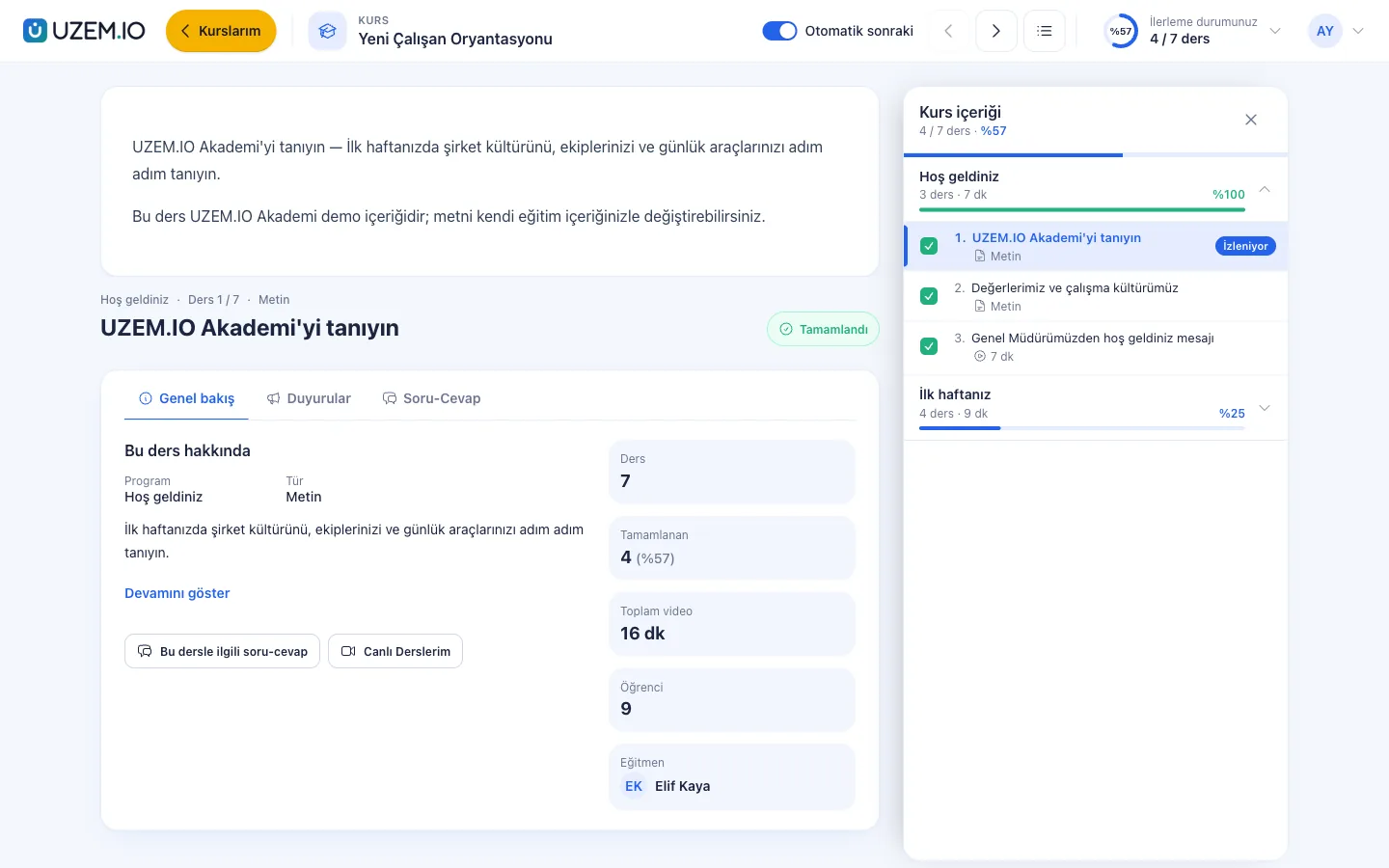
Overview
A one-person academy should look professional too
An independent instructor has to find time for creating content, planning lesson times, selling and answering learner questions all at once. On marketplaces, pricing and the relationship with learners are not in your hands, and a lesson schedule and payment tracking run through messaging apps take time as well. With UZEM you set up your own storefront, put your live sessions on the calendar, decide your own prices and campaigns, and stay in direct contact with your learners.
- A storefront under your own brand Publish a course site of your own with your logo, colors and introductory copy.
- Pricing is your decision Set the course price, the discounted price and coupon campaigns yourself.
- Preview lessons Open the first lessons of a course to everyone and show your teaching style before people buy.
- Knowledge test and certificate Learners who pass the end-of-course test automatically receive a certificate that can be verified with a QR code.
- Live sessions on the calendar Plan one-to-one or group live sessions with your own Zoom account; the session time appears on the learner's calendar, and if Zoom cloud recording is on, the recording is added to the lesson.
- Learner questions in one place Answer questions from lesson pages in the dashboard, instead of replying to the same question again and again.
- Community area Open discussion topics for your course learners so they can help each other.

Industry challenges and solutions
Problem
On a marketplace, pricing and the relationship with learners are not in the instructor's hands.
Solution
Sell your courses on your own storefront, so the price, campaigns and learner list are yours.
Problem
Payment tracking and access are handled by hand.
Solution
Card payments open access instantly; approve bank transfer notices in one click from the dashboard.
Problem
You cannot tell whether learners finished the course.
Solution
Viewing progress and test results are reported by course, and you can remind learners who are behind.
Problem
Lesson times and links get lost in messaging apps.
Solution
Enter live session times in the program; the session appears on the learner's calendar and the learner joins from their dashboard.
Problem
People question whether the certificates you issue are genuine.
Solution
Anyone who scans the QR code on the certificate can check that it is valid.
Who uses it?
Instructor
Prepares the course, plans live session times, sets the price, answers learner questions and tracks sales in reports.
Assistant instructor
If you wish, a second instructor you add answers learner questions and grades assignments in the program you assign.
Learner
Buys the course, joins live sessions, watches videos at their own pace, completes the test and downloads their certificate.
Corporate client
A company that buys a course for its employees receives the attendance list from you as a report.
Use cases
- Office software course Courses that teach Excel and presentation software with hands-on videos.
- Personal development program Development courses that progress through short videos and practice files.
- Expertise bundle Offer beginner and advanced courses in one bundle at a discounted price.
- One-to-one live sessions Live sessions held with your own Zoom account in a program dedicated to one learner, with lesson notes and assignments in the same place.
- Group sales to companies Enroll a company's employees in a course in bulk and share the attendance report.
Features
Features you'll use
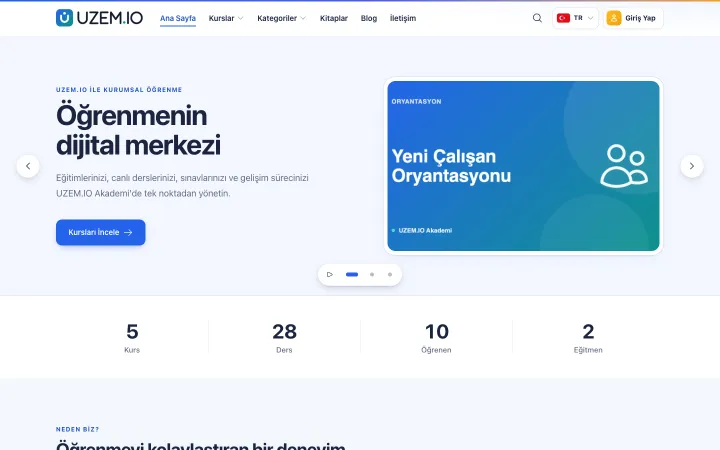
Course Storefront
Manage your academy's public website with a course catalog, course landing pages, sliders, pop-ups, a blog and FAQs.
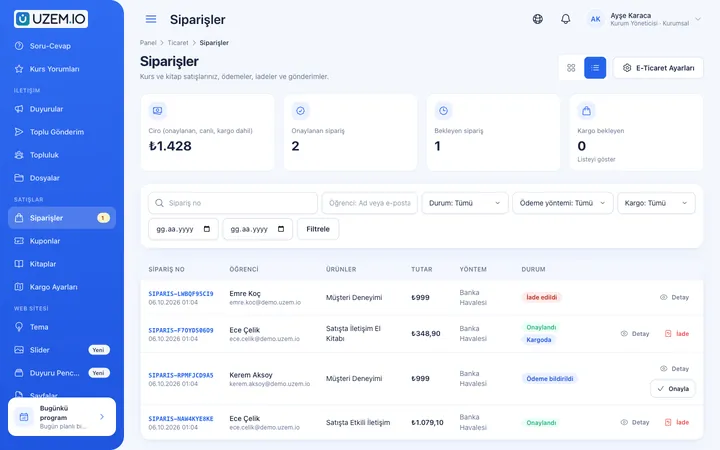
Course Sales
Sell courses from your own academy with a cart, coupons, bank transfer or card payments through your own PayTR or iyzico account, and printed books by bank transfer.
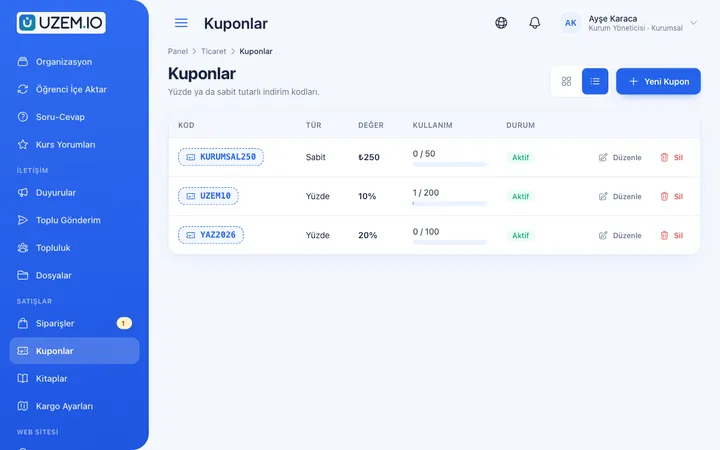
Coupons
Create percentage or fixed-amount discount coupons, and keep your promotions under control with usage limits and validity dates.
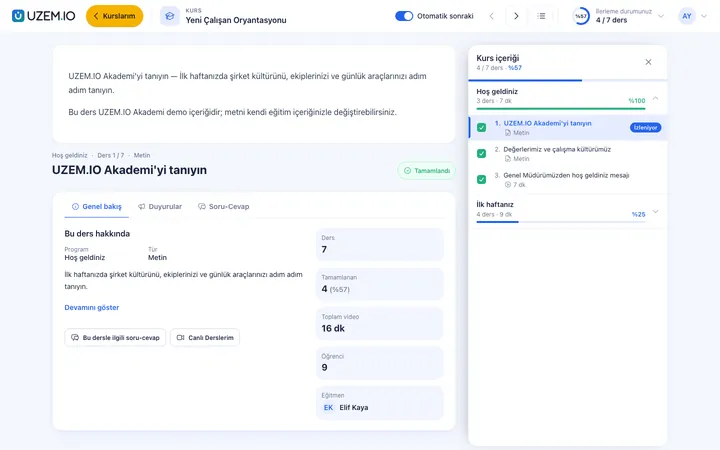
Video Training
Publish your video lessons through signed, short-lived links; record real watch time and complete lessons at 90% viewed.
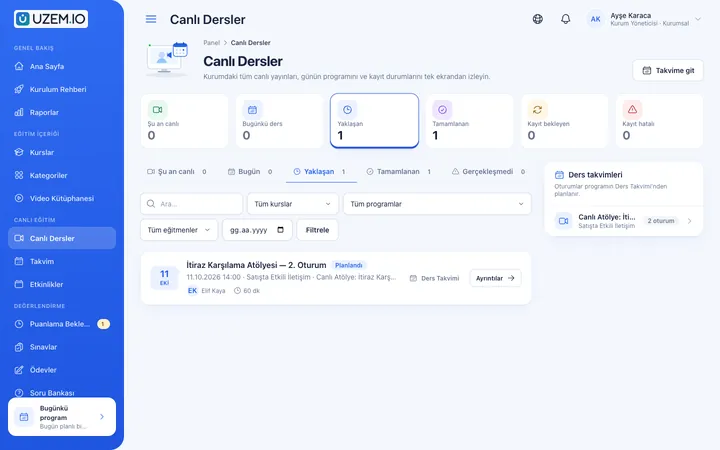
Live Training
Schedule live sessions inside your courses with your own Zoom account; attendance is recorded and, when Zoom cloud recording is on, the recording is added to the lesson automatically.
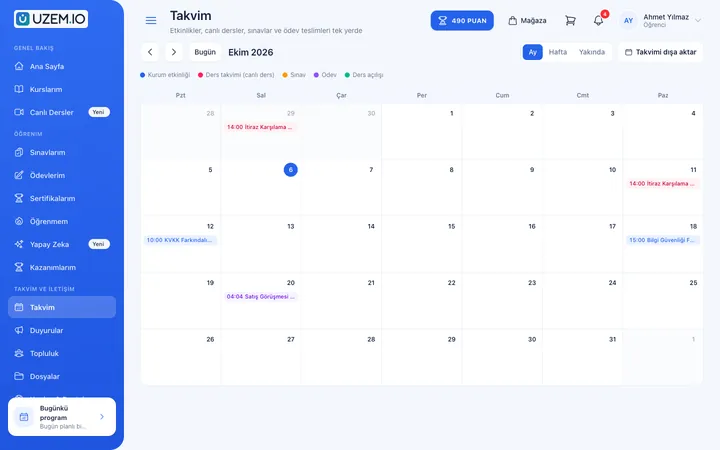
Class Calendar
Show live sessions, events and key dates together in each learner's own calendar.
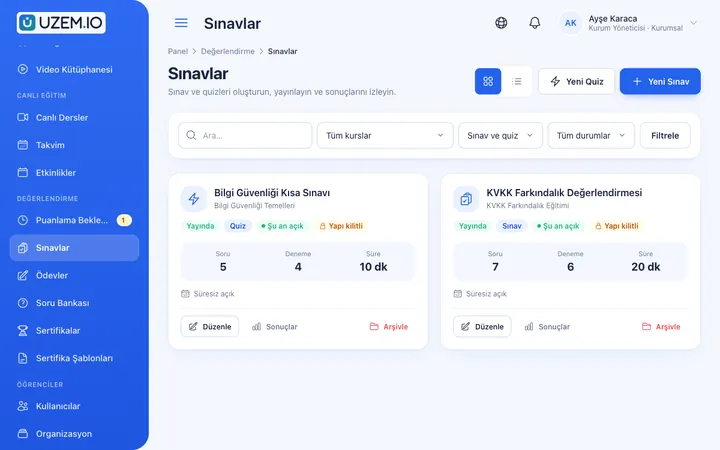
Exams
Measure learning with timed exams and quizzes; you decide the passing score, attempts, question shuffling and result visibility.
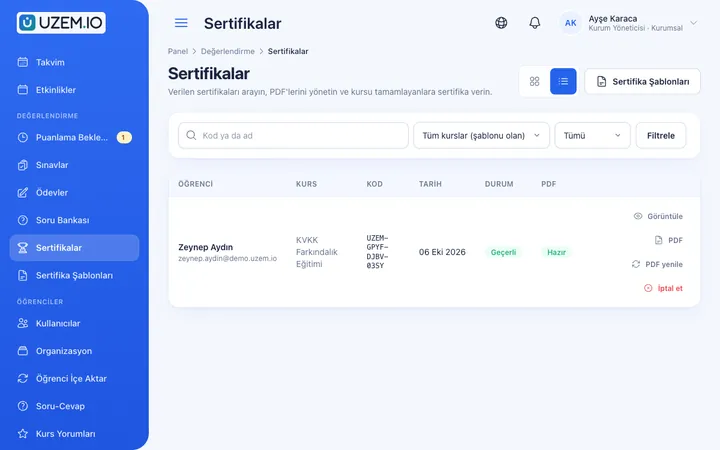
Certificates
Automatically issue certificates in your own design, verifiable by QR code, to everyone who completes a course.
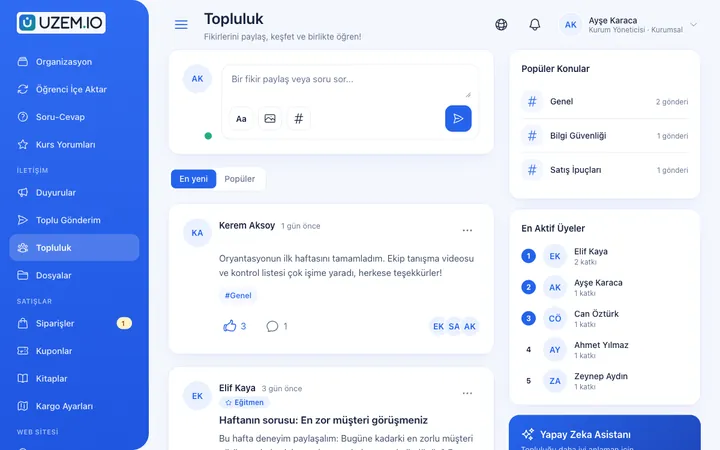
Community
Open a community space where your learners ask questions under topics, share experiences and help each other.
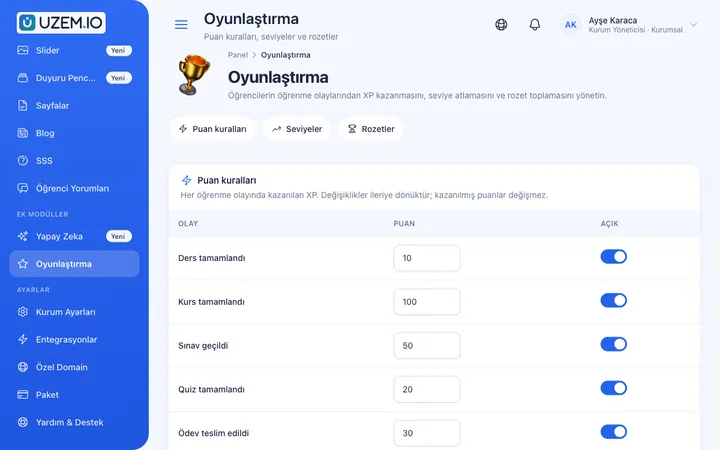
Gamification
Use points, badges, levels and leaderboards to make steady learner effort visible and motivating.
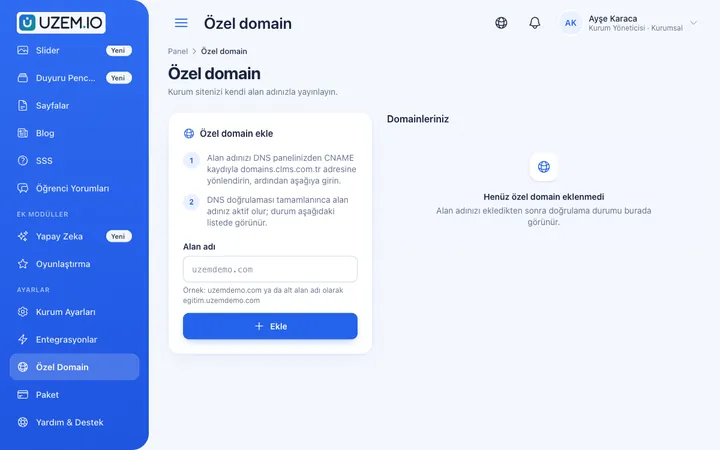
Custom Domain
On paid plans, publish your academy on your own domain, with verification and SSL certificate handled automatically.
This structure comes ready with your academy
No credit card required; explore a dashboard set up with sample content right away.
Sample academy
How your academy is prepared
When you open an account with this industry, the structure below is set up as a draft; you adjust everything to fit your organization.
6 categories
Courses, categories and bundles
Divide your courses into topic categories and offer complementary courses as a bundle. Plan your live sessions in a separate program for each learner or group. Learners see the courses they bought and their session times in their dashboard.
Sample structure: Instructor Academy → Office Software (Excel, Presentations) / Personal Development / Live Sessions / Bundles
- Data Analysis with ExcelA data reporting course using formulas, pivot tables and charts.
- Excel Quick StartA course, open for preview, that introduces the interface and basic operations.
- Excel Knowledge TestA short test that measures basic Excel knowledge.
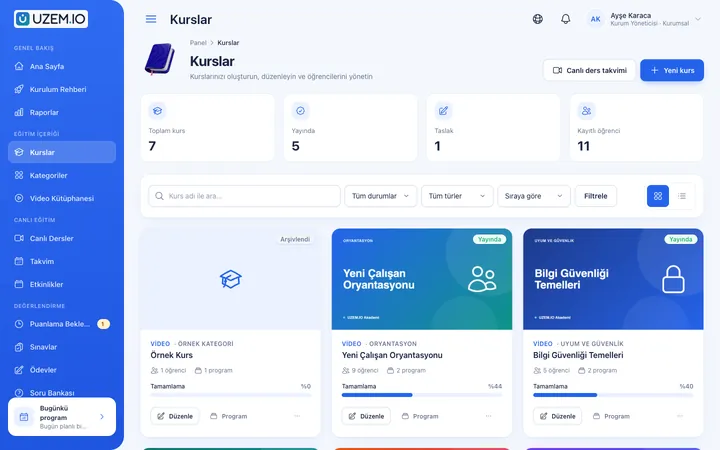
Measure and document learning
- At least one of the sample courses comes with a short quiz; you edit the questions in the question bank.
- You set the passing score, number of attempts and question shuffling.
- Those who complete receive a certificate verifiable by QR code; the template comes ready.
- You open assignments for hands-on work and grade the submissions.
See your earnings and your learners' progress together
Track your sales, learners' viewing progress, live session attendance, test results and certificates issued from one dashboard.
- Earnings reportShows collections, refunds and net earnings from your course sales by day, month or year.
- Learner progress reportLists where learners are in the course.
- Live session attendance reportShows the expected and actual number of learners, the attendance rate and the average attendance time for each live session.
- Certificate reportLists learners who received certificates, with dates.
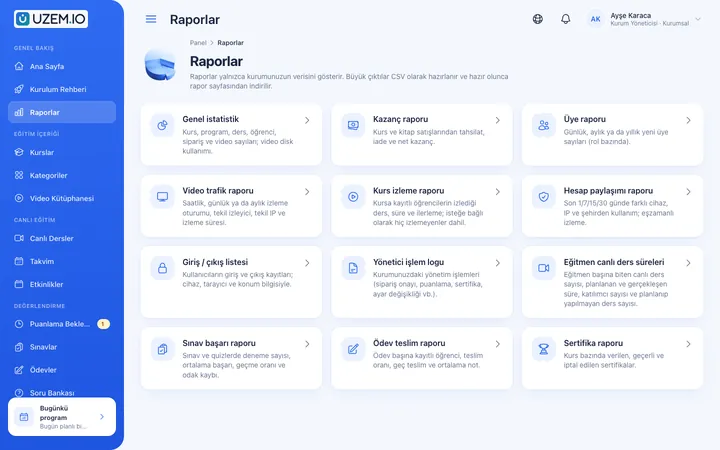
Your academy opens in preparation mode: Office Software and Personal Development categories, a welcome announcement and storefront copy come ready. Once you publish your first course and your academy, you can start selling.
Rollout steps
- Enter your academy detailsAdd your logo, seller details and introductory copy.
- Connect payments and ZoomConnect your PayTR or iyzico account and, for live sessions, your own Zoom account; you can also sell by bank transfer.
- Publish your first courseAdd your videos to sections, choose preview lessons, enter live session times and set the price.
- Publish your academyCheck your storefront and open your academy to visitors.
Solutions for this industry
- Launch an Online Academy Quickly launch an online academy under your own brand on a free UZEM subdomain, without setting up servers, a software team or a separate payment system; connect your own domain on paid plans.
- Course Sales Sell courses, live training and books from your own storefront: cart, coupons, card payment through your own PayTR/iyzico account or bank transfer (bank transfer only for printed books), and order management in one dashboard.
- Live Training Management If Zoom links, attendance lists and recordings are scattered everywhere: schedule live sessions inside the course, record attendance automatically and add the session recording to the lesson.
- Certificate Programs Combine training, exams and certification in one flow: you set the success criteria, the certificate is generated automatically, and third parties verify its authenticity with a QR code.
FAQ
Frequently asked questions
If your answer isn't here, check the help center or write to us.
Help centerCan I open an academy on my own?
Yes. As an independent instructor you can open your own academy and sell your courses under your own name.
Who sets the course price and discounts?
You set the price, the discounted price and coupon campaigns.
Where do payments go?
Card payments go to your own PayTR or iyzico account; you track bank transfer payments in your own bank account.
Can learners receive certificates?
Yes. Learners who complete the course and, if there is one, the test receive a certificate that can be verified with a QR code.
How do I upload my videos?
Upload your lesson videos from the dashboard, split them into sections and put them in order.
Can I teach one-to-one live sessions?
Yes. You open a separate program for the learner and enter the session times; the session runs on your own Zoom account and appears on the learner's calendar. There is no booking system where learners choose a session time themselves.
Can I connect my own domain?
On paid plans you can connect your own domain; on the free plan, the subdomain assigned to you is used.
Industries in the same group
Get started now
Set up your academy for Instructors today
Start on the free plan with no time limit and upgrade whenever you like.
- Free plan with no time limit
- No credit card required